AzureFixes Logo
AZUREFIXES
DEBUG FASTER. DEPLOY SMARTER.
Enterprise Customer Portal on Azure

Enterprise Customer Portal on Azure

Activearchitecture

A complete 17-phase implementation guide for a production-grade three-tier web portal on Azure: VNet isolation, private SQL, WAF at the edge, Managed Identity throughout, Azure DevOps CI/CD with DEV → UAT → PROD gates, blue/green slot swap, and Playwright cross-browser E2E testing as a deploy gate.

Tech Stack

TerraformAzure Front DoorApp Gateway WAFAzure App Service.NET 8ReactAzure SQLKey VaultRedisService BusAzure DevOpsPlaywright

Architecture Overview

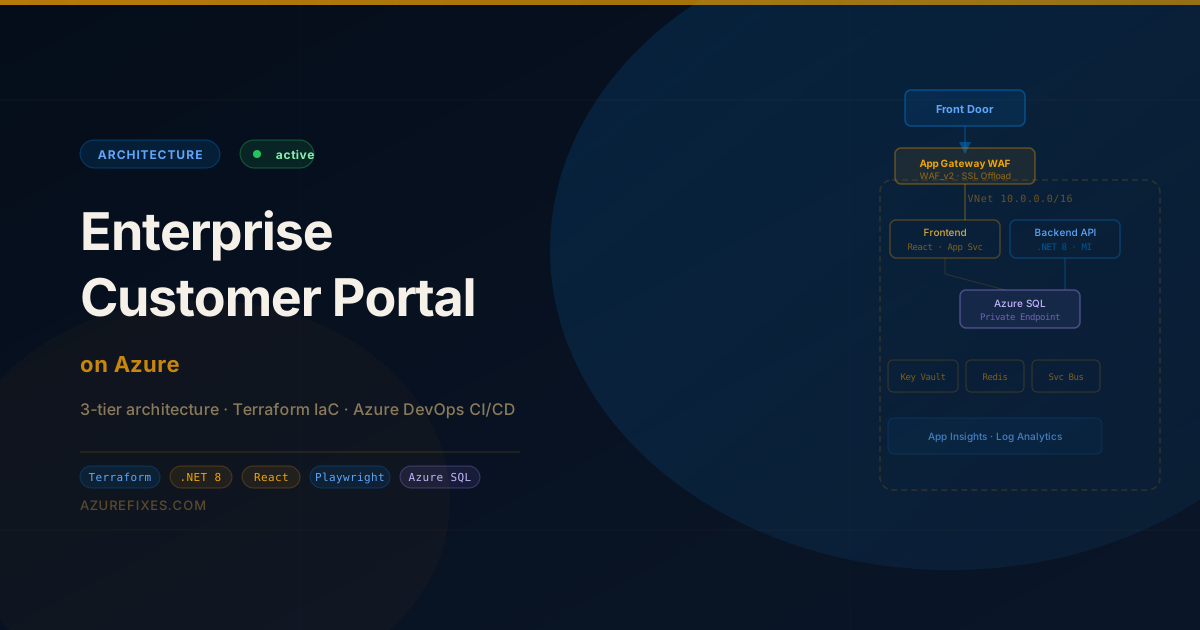
Full architecture: Front Door Premium → App Gateway WAF_v2 → VNet with App Services (React + .NET 8) → Azure SQL private endpoint. Shared services + CI/CD pipeline below.

Three-tier layout inside a single VNet (10.0.0.0/16). All PaaS data-plane traffic stays on private endpoints — no SQL, Key Vault, or Service Bus traffic ever reaches the public internet once it enters Azure.

Request flow:

Browser (HTTPS)
Azure Front Door Premium   (global anycast, DDoS, TLS 1.3, geo-routing)
App Gateway WAF_v2        (L7 routing, OWASP 3.2, health probes, SSL offload)
React App Service        (app-subnet, HTTPS-only, autoscale 2-10)
.NET 8 API App Service  (app-subnet, Managed Identity, autoscale 2-10)
Azure SQL              (data-subnet, private endpoint only)

Shared services (Key Vault, Storage, Service Bus, Redis, App Config) sit outside the VNet with Private Endpoints to shared-subnet.


Project Structure

portal/
├── infra/
│   ├── backend.tf              # Remote state configuration
│   ├── main.tf                 # Root module — calls all child modules
│   ├── variables.tf
│   ├── outputs.tf
│   ├── modules/
│   │   ├── network/            # Phase 2
│   │   ├── security/           # Phase 3
│   │   ├── data/               # Phase 4
│   │   ├── shared/             # Phase 5
│   │   ├── appservice/         # Phase 6 + 7
│   │   ├── edge/               # Phase 8 + 9
│   │   └── monitoring/         # Phase 10 + 11
│   └── env/
│       ├── dev.tfvars
│       ├── uat.tfvars
│       └── prod.tfvars
├── src/
│   ├── api/                    # .NET 8 Web API
│   └── web/                    # React app
├── pipelines/
│   └── azure-pipelines.yml     # Phase 13 + 14
└── tests/
    └── e2e/                    # Phase 15
        ├── playwright.config.ts
        └── specs/

Prerequisites

Azure resources needed before first terraform apply:

RequirementWhy
Azure subscription with Owner roleRequired to assign RBAC roles
Azure CLI 2.60+az bicep, az deployment, az webapp
Terraform 1.8+ or OpenTofu 1.9+azurerm ~> 4.0 provider
Azure DevOps organisationPipeline hosting
Node 20 LTSFrontend build + Playwright
.NET 8 SDKAPI build

Register required providers once per subscription:

az provider register --namespace Microsoft.Network
az provider register --namespace Microsoft.Web
az provider register --namespace Microsoft.Sql
az provider register --namespace Microsoft.KeyVault
az provider register --namespace Microsoft.Cache
az provider register --namespace Microsoft.ServiceBus
az provider register --namespace Microsoft.AppConfiguration
az provider register --namespace Microsoft.Insights
az provider register --namespace Microsoft.OperationalInsights
az provider register --namespace Microsoft.Cdn      # Front Door

Cost Estimate (DEV environment, East US)

ResourceSKUMonthly (approx.)
App Gateway WAF_v2Fixed capacity~$130
Front Door PremiumPer-request~$35
App Service Plan (×2)P1v3 Linux~$140
Azure SQLStandard S1 (20 DTU)~$30
Redis CacheStandard C1~$55
Service BusStandard~$10
Key VaultStandard~$5
Log AnalyticsPay-per-GB~$15
Total DEV~$420/month

PROD with zone-redundant SQL and autoscale adds roughly 2× this. Use Azure Cost Management alerts at 80% of budget.


Phase 1 — Remote State Backend

Create the storage account before any Terraform runs. This is a one-time manual step because Terraform can't manage the thing that stores its own state.

# Variables
RG="rg-tfstate"
SA="saportalstate$RANDOM"
CONTAINER="tfstate"
LOCATION="eastus"

az group create --name $RG --location $LOCATION

az storage account create \
  --name $SA \
  --resource-group $RG \
  --location $LOCATION \
  --sku Standard_GRS \
  --kind StorageV2 \
  --allow-blob-public-access false \
  --min-tls-version TLS1_2

az storage container create \
  --name $CONTAINER \
  --account-name $SA

# Enable versioning and soft-delete (safety nets)
az storage account blob-service-properties update \
  --account-name $SA \
  --resource-group $RG \
  --enable-versioning true \
  --delete-retention-days 14

echo "Storage account: $SA"

infra/backend.tf:

terraform {
  required_version = ">= 1.8"

  required_providers {
    azurerm = {
      source  = "hashicorp/azurerm"
      version = "~> 4.0"
    }
    random = {
      source  = "hashicorp/random"
      version = "~> 3.6"
    }
  }

  backend "azurerm" {
    resource_group_name  = "rg-tfstate"
    storage_account_name = "saportalstate"   # replace with your SA name
    container_name       = "tfstate"
    key                  = "portal.tfstate"
  }
}

provider "azurerm" {
  features {
    key_vault {
      purge_soft_delete_on_destroy    = false
      recover_soft_deleted_key_vaults = true
    }
    resource_group {
      prevent_deletion_if_contains_resources = true
    }
  }
}

Phase 2 — Network Layer

infra/modules/network/main.tf:

variable "env"      { type = string }
variable "location" { type = string }
variable "rg_name"  { type = string }

resource "azurerm_virtual_network" "main" {
  name                = "vnet-portal-${var.env}"
  resource_group_name = var.rg_name
  location            = var.location
  address_space       = ["10.0.0.0/16"]
}

# App subnet — App Service VNet Integration
resource "azurerm_subnet" "app" {
  name                 = "app-subnet"
  resource_group_name  = var.rg_name
  virtual_network_name = azurerm_virtual_network.main.name
  address_prefixes     = ["10.0.1.0/24"]

  delegation {
    name = "webapp-delegation"
    service_delegation {
      name    = "Microsoft.Web/serverFarms"
      actions = ["Microsoft.Network/virtualNetworks/subnets/action"]
    }
  }
}

# Data subnet — SQL private endpoint
resource "azurerm_subnet" "data" {
  name                 = "data-subnet"
  resource_group_name  = var.rg_name
  virtual_network_name = azurerm_virtual_network.main.name
  address_prefixes     = ["10.0.2.0/24"]
}

# App Gateway subnet — must be dedicated, no delegations
resource "azurerm_subnet" "appgw" {
  name                 = "appgw-subnet"
  resource_group_name  = var.rg_name
  virtual_network_name = azurerm_virtual_network.main.name
  address_prefixes     = ["10.0.3.0/24"]
}

# Shared services subnet — Key Vault, Storage, Service Bus, Redis PEs
resource "azurerm_subnet" "shared" {
  name                 = "shared-subnet"
  resource_group_name  = var.rg_name
  virtual_network_name = azurerm_virtual_network.main.name
  address_prefixes     = ["10.0.4.0/24"]
}

# NSG: app subnet — only allow inbound from App Gateway subnet
resource "azurerm_network_security_group" "app" {
  name                = "nsg-app-${var.env}"
  resource_group_name = var.rg_name
  location            = var.location

  security_rule {
    name                       = "AllowAppGateway"
    priority                   = 100
    direction                  = "Inbound"
    access                     = "Allow"
    protocol                   = "Tcp"
    source_port_range          = "*"
    destination_port_ranges    = ["80", "443"]
    source_address_prefix      = "10.0.3.0/24"
    destination_address_prefix = "*"
  }

  security_rule {
    name                       = "DenyAllInbound"
    priority                   = 4096
    direction                  = "Inbound"
    access                     = "Deny"
    protocol                   = "*"
    source_port_range          = "*"
    destination_port_range     = "*"
    source_address_prefix      = "*"
    destination_address_prefix = "*"
  }
}

resource "azurerm_subnet_network_security_group_association" "app" {
  subnet_id                 = azurerm_subnet.app.id
  network_security_group_id = azurerm_network_security_group.app.id
}

output "vnet_id"          { value = azurerm_virtual_network.main.id }
output "app_subnet_id"    { value = azurerm_subnet.app.id }
output "data_subnet_id"   { value = azurerm_subnet.data.id }
output "appgw_subnet_id"  { value = azurerm_subnet.appgw.id }
output "shared_subnet_id" { value = azurerm_subnet.shared.id }

Phase 3 — Key Vault & Secrets

variable "env"           { type = string }
variable "location"      { type = string }
variable "rg_name"       { type = string }
variable "tenant_id"     { type = string }
variable "devops_sp_oid" { type = string }  # pipeline service principal OID

data "azurerm_client_config" "current" {}

resource "azurerm_key_vault" "main" {
  name                        = "kv-portal-${var.env}"
  resource_group_name         = var.rg_name
  location                    = var.location
  tenant_id                   = var.tenant_id
  sku_name                    = "standard"
  enable_rbac_authorization   = true          # RBAC mode — no access policies
  purge_protection_enabled    = true
  soft_delete_retention_days  = 90
  public_network_access_enabled = false       # Private endpoint only
}

# Grant the DevOps pipeline SP read access to secrets
resource "azurerm_role_assignment" "devops_kv_reader" {
  scope                = azurerm_key_vault.main.id
  role_definition_name = "Key Vault Secrets User"
  principal_id         = var.devops_sp_oid
}

# Grant the current Terraform principal admin access for seeding secrets
resource "azurerm_role_assignment" "tf_kv_admin" {
  scope                = azurerm_key_vault.main.id
  role_definition_name = "Key Vault Secrets Officer"
  principal_id         = data.azurerm_client_config.current.object_id
}

# Private endpoint for Key Vault (into shared-subnet)
resource "azurerm_private_endpoint" "kv" {
  name                = "pe-kv-${var.env}"
  resource_group_name = var.rg_name
  location            = var.location
  subnet_id           = var.shared_subnet_id

  private_service_connection {
    name                           = "kv-psc"
    private_connection_resource_id = azurerm_key_vault.main.id
    subresource_names              = ["vault"]
    is_manual_connection           = false
  }

  private_dns_zone_group {
    name                 = "kv-dns-group"
    private_dns_zone_ids = [azurerm_private_dns_zone.kv.id]
  }
}

resource "azurerm_private_dns_zone" "kv" {
  name                = "privatelink.vaultcore.azure.net"
  resource_group_name = var.rg_name
}

resource "azurerm_private_dns_zone_virtual_network_link" "kv" {
  name                  = "kv-dns-link"
  resource_group_name   = var.rg_name
  private_dns_zone_name = azurerm_private_dns_zone.kv.name
  virtual_network_id    = var.vnet_id
  registration_enabled  = false
}

output "kv_id"  { value = azurerm_key_vault.main.id }
output "kv_uri" { value = azurerm_key_vault.main.vault_uri }

Phase 4 — Azure SQL & Private DNS

variable "sql_admin_login"    { type = string }
variable "sql_admin_password" {
  type      = string
  sensitive = true
}

resource "azurerm_mssql_server" "main" {
  name                          = "sql-portal-${var.env}"
  resource_group_name           = var.rg_name
  location                      = var.location
  version                       = "12.0"
  administrator_login           = var.sql_admin_login
  administrator_login_password  = var.sql_admin_password
  public_network_access_enabled = false          # CRITICAL — no public access

  azuread_administrator {
    login_username              = "portal-dba-group"
    object_id                   = var.dba_group_oid
    azuread_authentication_only = false
  }
}

resource "azurerm_mssql_database" "main" {
  name                        = "portaldb"
  server_id                   = azurerm_mssql_server.main.id
  collation                   = "SQL_Latin1_General_CP1_CI_AS"
  max_size_gb                 = 32
  sku_name                    = "S1"
  zone_redundant              = var.env == "prod" ? true : false

  short_term_retention_policy {
    retention_days           = 7
    backup_interval_in_hours = 12
  }
}

# Private endpoint for SQL
resource "azurerm_private_endpoint" "sql" {
  name                = "pe-sql-${var.env}"
  resource_group_name = var.rg_name
  location            = var.location
  subnet_id           = var.data_subnet_id

  private_service_connection {
    name                           = "sql-psc"
    private_connection_resource_id = azurerm_mssql_server.main.id
    subresource_names              = ["sqlServer"]
    is_manual_connection           = false
  }

  private_dns_zone_group {
    name                 = "sql-dns-group"
    private_dns_zone_ids = [azurerm_private_dns_zone.sql.id]
  }
}

# Private DNS zone — REQUIRED for the FQDN to resolve to 10.0.2.x inside the VNet
resource "azurerm_private_dns_zone" "sql" {
  name                = "privatelink.database.windows.net"
  resource_group_name = var.rg_name
}

resource "azurerm_private_dns_zone_virtual_network_link" "sql" {
  name                  = "sql-dns-link"
  resource_group_name   = var.rg_name
  private_dns_zone_name = azurerm_private_dns_zone.sql.name
  virtual_network_id    = var.vnet_id
  registration_enabled  = false
}

Why the Private DNS zone matters: Even after you create a private endpoint, the SQL FQDN (sql-portal-dev.database.windows.net) still resolves to the public IP by default. The Private DNS zone overrides this so the name resolves to 10.0.2.x from within the VNet. Without it, a connection from App Service would fail because the DNS lookup returns the public IP, which is blocked.


Phase 5 — Shared Services

# Storage Account (GRS, no public blob access)
resource "azurerm_storage_account" "main" {
  name                            = "stportal${var.env}${random_string.suffix.result}"
  resource_group_name             = var.rg_name
  location                        = var.location
  account_tier                    = "Standard"
  account_replication_type        = var.env == "prod" ? "GRS" : "LRS"
  allow_nested_items_to_be_public = false
  min_tls_version                 = "TLS1_2"
  https_traffic_only_enabled      = true

  blob_properties {
    versioning_enabled = true
    delete_retention_policy { days = 30 }
  }
}

# Service Bus (async order/notification messages)
resource "azurerm_servicebus_namespace" "main" {
  name                = "sb-portal-${var.env}"
  resource_group_name = var.rg_name
  location            = var.location
  sku                 = "Standard"
  minimum_tls_version = "1.2"
}

resource "azurerm_servicebus_queue" "orders" {
  name         = "orders"
  namespace_id = azurerm_servicebus_namespace.main.id

  max_size_in_megabytes            = 1024
  default_message_ttl              = "P14D"
  dead_lettering_on_message_expiration = true
}

# Redis (session + cache)
resource "azurerm_redis_cache" "main" {
  name                = "redis-portal-${var.env}"
  resource_group_name = var.rg_name
  location            = var.location
  capacity            = 1
  family              = "C"
  sku_name            = "Standard"
  minimum_tls_version = "1.2"
  non_ssl_port_enabled = false
}

# App Configuration (feature flags + shared settings)
resource "azurerm_app_configuration" "main" {
  name                = "appconfig-portal-${var.env}"
  resource_group_name = var.rg_name
  location            = var.location
  sku                 = "standard"
}

Phase 6 — App Service Plans & Web Apps

# One Service Plan per app (independent autoscale)
resource "azurerm_service_plan" "api" {
  name                = "asp-portal-api-${var.env}"
  resource_group_name = var.rg_name
  location            = var.location
  os_type             = "Linux"
  sku_name            = "P1v3"
}

resource "azurerm_linux_web_app" "api" {
  name                = "app-portal-api-${var.env}"
  resource_group_name = var.rg_name
  location            = var.location
  service_plan_id     = azurerm_service_plan.api.id
  https_only          = true

  site_config {
    minimum_tls_version       = "1.2"
    ftps_state                = "Disabled"
    health_check_path         = "/health"
    health_check_eviction_time_in_min = 5

    application_stack {
      dotnet_version = "8.0"
    }

    ip_restriction_default_action = "Deny"
    ip_restriction {
      service_tag               = "AppGateway"
      priority                  = 100
      action                    = "Allow"
      description               = "Allow traffic from App Gateway only"
    }
  }

  identity {
    type = "SystemAssigned"
  }

  app_settings = {
    "APPLICATIONINSIGHTS_CONNECTION_STRING" = "@Microsoft.KeyVault(VaultName=${var.kv_name};SecretName=ai-connection-string)"
    "AZURE_SQL_CONNECTION_STRING"           = "@Microsoft.KeyVault(VaultName=${var.kv_name};SecretName=sql-connection-string)"
    "SERVICEBUS_CONNECTION_STRING"          = "@Microsoft.KeyVault(VaultName=${var.kv_name};SecretName=sb-connection-string)"
    "REDIS_CONNECTION_STRING"               = "@Microsoft.KeyVault(VaultName=${var.kv_name};SecretName=redis-connection-string)"
    "ASPNETCORE_ENVIRONMENT"                = var.aspnet_env
  }
}

resource "azurerm_service_plan" "web" {
  name                = "asp-portal-web-${var.env}"
  resource_group_name = var.rg_name
  location            = var.location
  os_type             = "Linux"
  sku_name            = "P1v3"
}

resource "azurerm_linux_web_app" "web" {
  name                = "app-portal-web-${var.env}"
  resource_group_name = var.rg_name
  location            = var.location
  service_plan_id     = azurerm_service_plan.web.id
  https_only          = true

  site_config {
    minimum_tls_version = "1.2"
    ftps_state          = "Disabled"
    health_check_path   = "/"
    application_stack {
      node_version = "20-lts"
    }
    ip_restriction_default_action = "Deny"
    ip_restriction {
      service_tag = "AppGateway"
      priority    = 100
      action      = "Allow"
    }
  }

  app_settings = {
    "REACT_APP_API_URL" = "https://app-portal-api-${var.env}.azurewebsites.net"
  }
}

Phase 7 — VNet Integration & Managed Identity

# VNet integration — routes outbound traffic through app-subnet
resource "azurerm_app_service_virtual_network_swift_connection" "api" {
  app_service_id = azurerm_linux_web_app.api.id
  subnet_id      = var.app_subnet_id
}

resource "azurerm_app_service_virtual_network_swift_connection" "web" {
  app_service_id = azurerm_linux_web_app.web.id
  subnet_id      = var.app_subnet_id
}

# Grant API managed identity access to Key Vault secrets
resource "azurerm_role_assignment" "api_kv" {
  scope                = var.kv_id
  role_definition_name = "Key Vault Secrets User"
  principal_id         = azurerm_linux_web_app.api.identity[0].principal_id
}

# Grant API managed identity access to SQL (create contained user in SQL separately)
resource "azurerm_role_assignment" "api_storage" {
  scope                = var.storage_id
  role_definition_name = "Storage Blob Data Contributor"
  principal_id         = azurerm_linux_web_app.api.identity[0].principal_id
}

# Grant API managed identity access to Service Bus
resource "azurerm_role_assignment" "api_sb" {
  scope                = var.servicebus_id
  role_definition_name = "Azure Service Bus Data Sender"
  principal_id         = azurerm_linux_web_app.api.identity[0].principal_id
}

SQL connection string using Managed Identity (no password):

// appsettings.json — pulled from Key Vault at startup
{
  "ConnectionStrings": {
    "PortalDb": "Server=tcp:sql-portal-prod.database.windows.net,1433;
                 Authentication=Active Directory Default;
                 Database=portaldb;
                 Encrypt=True;TrustServerCertificate=False;"
  }
}

Create a contained database user in SQL for the Managed Identity (one-time, run as Azure AD admin):

CREATE USER [app-portal-api-prod] FROM EXTERNAL PROVIDER;
ALTER ROLE db_datareader ADD MEMBER [app-portal-api-prod];
ALTER ROLE db_datawriter ADD MEMBER [app-portal-api-prod];

Phase 8 — Azure Front Door Premium

resource "azurerm_cdn_frontdoor_profile" "main" {
  name                = "fd-portal-${var.env}"
  resource_group_name = var.rg_name
  sku_name            = "Premium_AzureFrontDoor"
}

resource "azurerm_cdn_frontdoor_endpoint" "main" {
  name                     = "portal-${var.env}"
  cdn_frontdoor_profile_id = azurerm_cdn_frontdoor_profile.main.id
}

resource "azurerm_cdn_frontdoor_origin_group" "appgw" {
  name                     = "appgw-origin-group"
  cdn_frontdoor_profile_id = azurerm_cdn_frontdoor_profile.main.id

  load_balancing {
    additional_latency_in_milliseconds = 0
    sample_size                        = 16
    successful_samples_required        = 3
  }

  health_probe {
    interval_in_seconds = 30
    path                = "/health"
    protocol            = "Https"
    request_type        = "GET"
  }
}

resource "azurerm_cdn_frontdoor_origin" "appgw" {
  name                          = "appgw"
  cdn_frontdoor_origin_group_id = azurerm_cdn_frontdoor_origin_group.appgw.id
  enabled                       = true
  host_name                     = azurerm_public_ip.appgw.ip_address
  http_port                     = 80
  https_port                    = 443
  certificate_name_check_enabled = true
  priority                       = 1
  weight                         = 1000
}

resource "azurerm_cdn_frontdoor_rule_set" "main" {
  name                     = "defaultRules"
  cdn_frontdoor_profile_id = azurerm_cdn_frontdoor_profile.main.id
}

resource "azurerm_cdn_frontdoor_route" "main" {
  name                          = "default-route"
  cdn_frontdoor_endpoint_id     = azurerm_cdn_frontdoor_endpoint.main.id
  cdn_frontdoor_origin_group_id = azurerm_cdn_frontdoor_origin_group.appgw.id
  cdn_frontdoor_origin_ids      = [azurerm_cdn_frontdoor_origin.appgw.id]
  cdn_frontdoor_rule_set_ids    = [azurerm_cdn_frontdoor_rule_set.main.id]
  enabled                       = true
  forwarding_protocol           = "HttpsOnly"
  https_redirect_enabled        = true
  patterns_to_match             = ["/*"]
  supported_protocols           = ["Http", "Https"]
}

Phase 9 — Application Gateway WAF_v2

resource "azurerm_public_ip" "appgw" {
  name                = "pip-appgw-${var.env}"
  resource_group_name = var.rg_name
  location            = var.location
  allocation_method   = "Static"
  sku                 = "Standard"
}

resource "azurerm_web_application_firewall_policy" "main" {
  name                = "waf-policy-${var.env}"
  resource_group_name = var.rg_name
  location            = var.location

  policy_settings {
    enabled                     = true
    mode                        = "Prevention"
    request_body_check          = true
    max_request_body_size_in_kb = 128
    file_upload_limit_in_mb     = 100
  }

  managed_rules {
    managed_rule_set {
      type    = "OWASP"
      version = "3.2"
    }
    managed_rule_set {
      type    = "Microsoft_BotManagerRuleSet"
      version = "1.0"
    }
  }
}

resource "azurerm_application_gateway" "main" {
  name                = "appgw-portal-${var.env}"
  resource_group_name = var.rg_name
  location            = var.location

  sku {
    name     = "WAF_v2"
    tier     = "WAF_v2"
    capacity = var.env == "prod" ? 2 : 1
  }

  firewall_policy_id = azurerm_web_application_firewall_policy.main.id

  gateway_ip_configuration {
    name      = "appgw-ip-config"
    subnet_id = var.appgw_subnet_id
  }

  frontend_ip_configuration {
    name                 = "frontend-ip"
    public_ip_address_id = azurerm_public_ip.appgw.id
  }

  frontend_port {
    name = "https-port"
    port = 443
  }

  ssl_certificate {
    name                = "portal-cert"
    key_vault_secret_id = var.ssl_cert_secret_id
  }

  backend_address_pool {
    name  = "api-pool"
    fqdns = ["${azurerm_linux_web_app.api.name}.azurewebsites.net"]
  }

  backend_address_pool {
    name  = "web-pool"
    fqdns = ["${azurerm_linux_web_app.web.name}.azurewebsites.net"]
  }

  backend_http_settings {
    name                                = "https-settings"
    cookie_based_affinity               = "Disabled"
    protocol                            = "Https"
    port                                = 443
    request_timeout                     = 30
    pick_host_name_from_backend_address = true

    probe_name = "health-probe"
  }

  probe {
    name                                      = "health-probe"
    protocol                                  = "Https"
    path                                      = "/health"
    interval                                  = 30
    timeout                                   = 10
    unhealthy_threshold                       = 3
    pick_host_name_from_backend_http_settings = true
    match {
      status_code = ["200"]
    }
  }

  http_listener {
    name                           = "https-listener"
    frontend_ip_configuration_name = "frontend-ip"
    frontend_port_name             = "https-port"
    protocol                       = "Https"
    ssl_certificate_name           = "portal-cert"
  }

  request_routing_rule {
    name                       = "default-rule"
    rule_type                  = "Basic"
    http_listener_name         = "https-listener"
    backend_address_pool_name  = "web-pool"
    backend_http_settings_name = "https-settings"
    priority                   = 100
  }
}

Phase 10 — Log Analytics Workspace

resource "azurerm_log_analytics_workspace" "main" {
  name                = "log-portal-${var.env}"
  resource_group_name = var.rg_name
  location            = var.location
  sku                 = "PerGB2018"
  retention_in_days   = var.env == "prod" ? 90 : 30
}

# Send App Gateway WAF logs to Log Analytics
resource "azurerm_monitor_diagnostic_setting" "appgw" {
  name                       = "diag-appgw"
  target_resource_id         = azurerm_application_gateway.main.id
  log_analytics_workspace_id = azurerm_log_analytics_workspace.main.id

  enabled_log { category = "ApplicationGatewayAccessLog" }
  enabled_log { category = "ApplicationGatewayFirewallLog" }
  metric { category = "AllMetrics" }
}

# Send SQL logs to Log Analytics
resource "azurerm_monitor_diagnostic_setting" "sql" {
  name                       = "diag-sql"
  target_resource_id         = azurerm_mssql_database.main.id
  log_analytics_workspace_id = azurerm_log_analytics_workspace.main.id

  enabled_log { category = "SQLInsights" }
  metric { category = "Basic" }
}

Phase 11 — Application Insights & Alerting

resource "azurerm_application_insights" "main" {
  name                = "ai-portal-${var.env}"
  resource_group_name = var.rg_name
  location            = var.location
  workspace_id        = azurerm_log_analytics_workspace.main.id
  application_type    = "web"
  retention_in_days   = 90
}

# Action Group — Email + Teams webhook
resource "azurerm_monitor_action_group" "main" {
  name                = "ag-portal-${var.env}"
  resource_group_name = var.rg_name
  short_name          = "portal"

  email_receiver {
    name          = "on-call"
    email_address = var.oncall_email
  }

  webhook_receiver {
    name        = "teams"
    service_uri = var.teams_webhook_url
  }
}

# Alert: API 5xx rate exceeds 10 in 5 minutes
resource "azurerm_monitor_metric_alert" "api_5xx" {
  name                = "alert-api-5xx-${var.env}"
  resource_group_name = var.rg_name
  scopes              = [azurerm_linux_web_app.api.id]
  description         = "API is returning 5xx errors"
  severity            = 1

  criteria {
    metric_namespace = "Microsoft.Web/sites"
    metric_name      = "Http5xx"
    aggregation      = "Total"
    operator         = "GreaterThan"
    threshold        = 10
  }

  window_size        = "PT5M"
  frequency          = "PT1M"
  action { action_group_id = azurerm_monitor_action_group.main.id }
}

# Alert: SQL DTU above 80%
resource "azurerm_monitor_metric_alert" "sql_dtu" {
  name                = "alert-sql-dtu-${var.env}"
  resource_group_name = var.rg_name
  scopes              = [azurerm_mssql_database.main.id]
  severity            = 2

  criteria {
    metric_namespace = "Microsoft.Sql/servers/databases"
    metric_name      = "dtu_consumption_percent"
    aggregation      = "Average"
    operator         = "GreaterThan"
    threshold        = 80
  }

  window_size = "PT10M"
  frequency   = "PT5M"
  action { action_group_id = azurerm_monitor_action_group.main.id }
}

Useful KQL query for WAF-blocked requests:

AzureDiagnostics
| where ResourceType == "APPLICATIONGATEWAYS"
| where Category == "ApplicationGatewayFirewallLog"
| where action_s == "Blocked"
| summarize count() by ruleId_s, clientIp_s, requestUri_s
| order by count_ desc
| take 50

Phase 12 — Azure DevOps Pipeline (Variables & Build Stage)

Create a Variable Group portal-secrets-$(env) in Azure DevOps Pipelines → Library for each environment with: ARM_CLIENT_ID, ARM_CLIENT_SECRET, ARM_SUBSCRIPTION_ID, ARM_TENANT_ID, SQL_ADMIN_PASSWORD.

pipelines/azure-pipelines.yml:

trigger:
  branches:
    include: [main]

variables:
  vmImage: 'ubuntu-latest'
  dotnetVersion: '8.x'
  nodeVersion: '20.x'
  tfVersion: '1.8.5'

stages:

# ─── STAGE 1: Build + Test ──────────────────────────────────────────────────
- stage: Build
  displayName: 'Build & Test'
  jobs:
  - job: BuildApi
    displayName: 'Build .NET API'
    pool:
      vmImage: $(vmImage)
    steps:
    - task: UseDotNet@2
      inputs:
        version: $(dotnetVersion)

    - script: dotnet restore src/api/PortalApi.csproj
      displayName: 'Restore packages'

    - script: dotnet build src/api/PortalApi.csproj --configuration Release --no-restore
      displayName: 'Build'

    - script: dotnet test src/api/PortalApi.Tests.csproj --configuration Release --no-build --logger trx
      displayName: 'Unit tests'

    - task: PublishTestResults@2
      inputs:
        testResultsFormat: 'VSTest'
        testResultsFiles: '**/*.trx'

    - script: |
        # Trivy security scan
        curl -sfL https://raw.githubusercontent.com/aquasecurity/trivy/main/contrib/install.sh | sh -s -- -b /usr/local/bin
        trivy fs --exit-code 1 --severity HIGH,CRITICAL src/api/
      displayName: 'Security scan'

    - task: DotNetCoreCLI@2
      inputs:
        command: 'publish'
        publishWebProjects: false
        projects: 'src/api/PortalApi.csproj'
        arguments: '--configuration Release --output $(Build.ArtifactStagingDirectory)/api'
      displayName: 'Publish API'

    - task: PublishBuildArtifacts@1
      inputs:
        pathToPublish: '$(Build.ArtifactStagingDirectory)/api'
        artifactName: 'api-drop'

  - job: BuildWeb
    displayName: 'Build React App'
    pool:
      vmImage: $(vmImage)
    steps:
    - task: NodeTool@0
      inputs:
        versionSpec: $(nodeVersion)

    - script: npm ci --prefix src/web
      displayName: 'npm ci'

    - script: npm run build --prefix src/web
      displayName: 'Build'
      env:
        REACT_APP_API_URL: 'placeholder'  # overridden at deploy time

    - task: PublishBuildArtifacts@1
      inputs:
        pathToPublish: 'src/web/build'
        artifactName: 'web-drop'

  - job: TerraformValidate
    displayName: 'Terraform Validate'
    pool:
      vmImage: $(vmImage)
    steps:
    - script: |
        wget -O tf.zip https://releases.hashicorp.com/terraform/$(tfVersion)/terraform_$(tfVersion)_linux_amd64.zip
        unzip tf.zip -d /usr/local/bin
      displayName: 'Install Terraform'

    - script: |
        cd infra
        terraform init -backend=false
        terraform validate
        terraform fmt -check -recursive
      displayName: 'Validate & Format check'

Phase 13 — Azure DevOps Pipeline (DEV → UAT → PROD Stages)

# (continues azure-pipelines.yml)

# ─── STAGE 2: DEV Deploy ────────────────────────────────────────────────────
- stage: DeployDev
  displayName: 'Deploy to DEV'
  dependsOn: Build
  condition: succeeded()
  variables:
  - group: portal-secrets-dev
  jobs:
  - deployment: Deploy
    displayName: 'Terraform + App Deploy'
    environment: 'portal-dev'
    pool:
      vmImage: $(vmImage)
    strategy:
      runOnce:
        deploy:
          steps:
          - checkout: self

          - script: |
              cd infra
              terraform init
              terraform plan -var-file=env/dev.tfvars -out=dev.tfplan
              terraform apply dev.tfplan
            displayName: 'Terraform apply (dev)'
            env:
              ARM_CLIENT_ID: $(ARM_CLIENT_ID)
              ARM_CLIENT_SECRET: $(ARM_CLIENT_SECRET)
              ARM_SUBSCRIPTION_ID: $(ARM_SUBSCRIPTION_ID)
              ARM_TENANT_ID: $(ARM_TENANT_ID)
              TF_VAR_sql_admin_password: $(SQL_ADMIN_PASSWORD)

          - task: AzureWebApp@1
            displayName: 'Deploy API'
            inputs:
              azureSubscription: 'azure-service-connection'
              appName: 'app-portal-api-dev'
              package: '$(Pipeline.Workspace)/api-drop'

          - task: AzureWebApp@1
            displayName: 'Deploy Web'
            inputs:
              azureSubscription: 'azure-service-connection'
              appName: 'app-portal-web-dev'
              package: '$(Pipeline.Workspace)/web-drop'

          # E2E tests run as deploy gate — see Phase 15
          - script: |
              npm ci --prefix tests/e2e
              BASE_URL=https://app-portal-web-dev.azurewebsites.net \
                npx playwright test --project=chromium
            displayName: 'Playwright E2E smoke test'

# ─── STAGE 3: UAT Deploy (requires manual approval) ─────────────────────────
- stage: DeployUat
  displayName: 'Deploy to UAT'
  dependsOn: DeployDev
  variables:
  - group: portal-secrets-uat
  jobs:
  - deployment: Deploy
    environment: 'portal-uat'        # approval gate configured in Environments UI
    pool:
      vmImage: $(vmImage)
    strategy:
      runOnce:
        deploy:
          steps:
          - checkout: self
          - script: |
              cd infra
              terraform init
              terraform apply -var-file=env/uat.tfvars -auto-approve
            displayName: 'Terraform apply (uat)'
            env:
              ARM_CLIENT_ID: $(ARM_CLIENT_ID)
              ARM_CLIENT_SECRET: $(ARM_CLIENT_SECRET)
              ARM_SUBSCRIPTION_ID: $(ARM_SUBSCRIPTION_ID)
              ARM_TENANT_ID: $(ARM_TENANT_ID)
              TF_VAR_sql_admin_password: $(SQL_ADMIN_PASSWORD)

          - task: AzureWebApp@1
            inputs:
              azureSubscription: 'azure-service-connection'
              appName: 'app-portal-api-uat'
              package: '$(Pipeline.Workspace)/api-drop'

          - task: AzureWebApp@1
            inputs:
              azureSubscription: 'azure-service-connection'
              appName: 'app-portal-web-uat'
              package: '$(Pipeline.Workspace)/web-drop'

# ─── STAGE 4: PROD Deploy (blue/green slot swap) ────────────────────────────
- stage: DeployProd
  displayName: 'Deploy to PROD'
  dependsOn: DeployUat
  variables:
  - group: portal-secrets-prod
  jobs:
  - deployment: Deploy
    environment: 'portal-prod'      # senior approval gate
    pool:
      vmImage: $(vmImage)
    strategy:
      runOnce:
        deploy:
          steps:
          - checkout: self
          - script: |
              cd infra
              terraform init
              terraform apply -var-file=env/prod.tfvars -auto-approve
            displayName: 'Terraform apply (prod)'
            env:
              ARM_CLIENT_ID: $(ARM_CLIENT_ID)
              ARM_CLIENT_SECRET: $(ARM_CLIENT_SECRET)
              ARM_SUBSCRIPTION_ID: $(ARM_SUBSCRIPTION_ID)
              ARM_TENANT_ID: $(ARM_TENANT_ID)
              TF_VAR_sql_admin_password: $(SQL_ADMIN_PASSWORD)

          # Deploy to staging slot first (blue/green)
          - task: AzureWebApp@1
            displayName: 'Deploy API to staging slot'
            inputs:
              azureSubscription: 'azure-service-connection'
              appName: 'app-portal-api-prod'
              deployToSlotOrASE: true
              slotName: 'staging'
              package: '$(Pipeline.Workspace)/api-drop'

          - task: AzureWebApp@1
            displayName: 'Deploy Web to staging slot'
            inputs:
              azureSubscription: 'azure-service-connection'
              appName: 'app-portal-web-prod'
              deployToSlotOrASE: true
              slotName: 'staging'
              package: '$(Pipeline.Workspace)/web-drop'

          # Health check on staging slot before swap
          - script: |
              for i in {1..10}; do
                STATUS=$(curl -s -o /dev/null -w "%{http_code}" \
                  https://app-portal-web-prod-staging.azurewebsites.net/health)
                echo "Attempt $i: HTTP $STATUS"
                [ "$STATUS" = "200" ] && break
                sleep 15
              done
              [ "$STATUS" != "200" ] && echo "Health check failed — not swapping" && exit 1
            displayName: 'Health check staging slot'

          # Swap staging → production
          - task: AzureAppServiceManage@0
            displayName: 'Swap slots (staging → production)'
            inputs:
              azureSubscription: 'azure-service-connection'
              action: 'Swap Slots'
              WebAppName: 'app-portal-web-prod'
              ResourceGroupName: 'rg-portal-prod'
              SourceSlot: 'staging'

Phase 14 — Playwright E2E Configuration

tests/e2e/playwright.config.ts:

import { defineConfig, devices } from '@playwright/test'

const BASE_URL = process.env.BASE_URL ?? 'http://localhost:3000'

export default defineConfig({
  testDir: './specs',
  timeout: 30_000,
  retries: process.env.CI ? 2 : 0,
  workers: process.env.CI ? 2 : undefined,

  reporter: [
    ['list'],
    ['html', { outputFolder: 'playwright-report', open: 'never' }],
    ['junit', { outputFile: 'test-results/results.xml' }],
  ],

  use: {
    baseURL: BASE_URL,
    trace: 'on-first-retry',
    screenshot: 'only-on-failure',
    video: 'on-first-retry',
  },

  projects: [
    { name: 'chromium', use: { ...devices['Desktop Chrome'] } },
    { name: 'firefox',  use: { ...devices['Desktop Firefox'] } },
    { name: 'webkit',   use: { ...devices['Desktop Safari'] } },
    { name: 'mobile-chrome', use: { ...devices['iPhone 13'] } },
  ],
})

tests/e2e/specs/smoke.spec.ts:

import { test, expect } from '@playwright/test'

test.describe('Portal smoke tests', () => {
  test('home page loads over HTTPS', async ({ page, request }) => {
    const response = await request.get('/')
    expect(response.status()).toBe(200)
    await page.goto('/')
    await expect(page).toHaveTitle(/Portal/)
    await expect(page.locator('h1')).toBeVisible()
  })

  test('API health endpoint returns 200', async ({ request }) => {
    const res = await request.get('/api/health')
    expect(res.status()).toBe(200)
    const json = await res.json()
    expect(json.status).toBe('healthy')
  })

  test('security headers present', async ({ request }) => {
    const res = await request.get('/')
    expect(res.headers()['strict-transport-security']).toBeTruthy()
    expect(res.headers()['x-content-type-options']).toBe('nosniff')
    expect(res.headers()['x-frame-options']).toBeTruthy()
  })

  test('sign-in redirects to Entra ID', async ({ page }) => {
    await page.goto('/login')
    await page.click('[data-testid="sign-in-button"]')
    await expect(page).toHaveURL(/login\.microsoftonline\.com/)
  })

  test('navigation links are reachable', async ({ page }) => {
    await page.goto('/')
    const links = page.locator('nav a')
    const count = await links.count()
    expect(count).toBeGreaterThan(0)
  })
})

Run against any environment:

# Local dev
BASE_URL=http://localhost:3000 npx playwright test

# Against DEV
BASE_URL=https://app-portal-web-dev.azurewebsites.net npx playwright test

# Specific browser only
BASE_URL=https://app-portal-web-dev.azurewebsites.net \
  npx playwright test --project=chromium

# Show HTML report after a run
npx playwright show-report playwright-report

Phase 15 — First Deployment Walkthrough

Complete sequence for bootstrapping a new environment (e.g., DEV):

# 1. Create resource group
az group create --name rg-portal-dev --location eastus

# 2. Bootstrap Terraform (Phase 1 — run once)
./scripts/bootstrap-state.sh

# 3. Initialize Terraform with the remote backend
cd infra
terraform init

# 4. Dry run — review all 40+ resources before creating anything
terraform plan -var-file=env/dev.tfvars -out=dev.tfplan

# 5. Apply — ~15-20 minutes for first run
terraform apply dev.tfplan

# 6. Seed Key Vault with application secrets
KV_NAME=$(terraform output -raw kv_name)

az keyvault secret set \
  --vault-name $KV_NAME \
  --name "sql-connection-string" \
  --value "Server=tcp:$(terraform output -raw sql_fqdn),1433;Authentication=Active Directory Default;Database=portaldb;Encrypt=True;"

az keyvault secret set \
  --vault-name $KV_NAME \
  --name "ai-connection-string" \
  --value "$(terraform output -raw ai_connection_string)"

# 7. Create SQL contained user for Managed Identity
SQL_SERVER=$(terraform output -raw sql_server_name)
az sql db show-connection-string \
  --client ado.net \
  --server $SQL_SERVER \
  --name portaldb

# Connect as Azure AD admin and run:
# CREATE USER [app-portal-api-dev] FROM EXTERNAL PROVIDER;
# ALTER ROLE db_datareader ADD MEMBER [app-portal-api-dev];
# ALTER ROLE db_datawriter ADD MEMBER [app-portal-api-dev];

# 8. Trigger first pipeline run
git push origin main
# Pipeline picks up the push and runs Build → DEV

Phase 16 — Blue/Green Production Deployment

The PROD stage uses deployment slots for zero-downtime releases. Both app-portal-api-prod and app-portal-web-prod must have a staging slot created via Terraform:

resource "azurerm_linux_web_app_slot" "api_staging" {
  name           = "staging"
  app_service_id = azurerm_linux_web_app.api.id

  site_config {
    minimum_tls_version = "1.2"
    ftps_state          = "Disabled"
    health_check_path   = "/health"
    application_stack {
      dotnet_version = "8.0"
    }
  }

  # Slot-specific settings — staging uses a separate App Config label
  app_settings = {
    "ASPNETCORE_ENVIRONMENT"                = "Staging"
    "APPLICATIONINSIGHTS_CONNECTION_STRING" = "@Microsoft.KeyVault(VaultName=${var.kv_name};SecretName=ai-connection-string)"
  }
}

Swap rollback: If an issue is discovered after the swap, the old production build is now in the staging slot and can be immediately swapped back:

az webapp deployment slot swap \
  --resource-group rg-portal-prod \
  --name app-portal-web-prod \
  --slot staging \
  --target-slot production

Phase 17 — Validation Checklist

Run after every environment provisioning to confirm security baseline:

CheckCommandExpected
SQL public access disabledaz sql server show --name sql-portal-dev --resource-group rg-portal-dev --query publicNetworkAccess"Disabled"
SQL DNS resolves via PEnslookup sql-portal-dev.database.windows.net (from VM in VNet)10.0.2.x
App Service HTTPS-onlyaz webapp show --name app-portal-api-dev --resource-group rg-portal-dev --query httpsOnlytrue
FTPS disabledaz webapp config show --name app-portal-api-dev --resource-group rg-portal-dev --query ftpsState"Disabled"
Key Vault public access offaz keyvault show --name kv-portal-dev --resource-group rg-portal-dev --query properties.publicNetworkAccess"Disabled"
Managed identity setaz webapp identity show --name app-portal-api-dev --resource-group rg-portal-dev --query type"SystemAssigned"
App Gateway backend healthyaz network application-gateway show-backend-health --name appgw-portal-dev --resource-group rg-portal-devAll: Healthy
WAF in Prevention modeaz network application-gateway waf-policy show --name waf-policy-dev --resource-group rg-portal-dev --query policySettings.mode"Prevention"
Telemetry flowingApp Insights Live Metrics → live request stream visibleRequests appear within 60s
E2E suite passingnpx playwright test --reporter=lineAll specs green, 4 browsers
HSTS header presentcurl -sI https://app-portal-web-dev.azurewebsites.net | grep -i strictstrict-transport-security: max-age=...

Teardown

When tearing down a non-production environment:

# Destroy all resources (irreversible!)
cd infra
terraform destroy -var-file=env/dev.tfvars

# Delete the resource group (catches anything Terraform missed)
az group delete --name rg-portal-dev --yes

# Remove the state file for this environment
az storage blob delete \
  --account-name saportalstate \
  --container-name tfstate \
  --name portal-dev.tfstate

Key Vault note: Even after destroy, Key Vault enters a soft-deleted state for 90 days (because purge_protection_enabled = true). To reuse the same name before 90 days, purge it manually:

az keyvault purge --name kv-portal-dev --location eastus

Notes & Caveats

App Gateway subnet restriction: The appgw-subnet must be a dedicated subnet. App Gateway WAF_v2 cannot share a subnet with other resources, and it cannot use a subnet that has any NSG rule blocking ports 65200-65535 (Azure infrastructure communication range).

Managed Identity and Key Vault references: The @Microsoft.KeyVault(...) syntax in App Settings requires the App Service to have the Key Vault Secrets User role on the specific Key Vault. The role assignment can take 5-10 minutes to propagate. If the app starts before propagation completes, it will fail to read secrets — restart the app once the role is active.

Front Door + App Gateway SSL: You'll need a custom TLS certificate in Key Vault for the App Gateway. Front Door terminates TLS from the client, then re-encrypts to the App Gateway using the backend certificate. Make sure the App Gateway's SSL cert matches what Front Door expects as the backend hostname.

Zone redundancy in DEV: Zone-redundant SQL and App Service Plans are skipped in DEV/UAT (var.env == "prod" ? true : false) to save cost. Add zone redundancy to staging environments before load testing if the test simulates production topology.

azurerm provider v4 breaking changes: The v4 provider dropped support for virtual_network_subnet_id in several resources and renamed several attributes. If migrating from v3, run terraform plan after upgrading and review all planned changes before applying. The azurerm_app_service_virtual_network_swift_connection pattern used in Phase 7 is the v4-compatible approach.

OpenTofu compatibility: All HCL in this guide is compatible with OpenTofu 1.9+. Use tofu in place of terraform commands if your team is on the open-source fork.